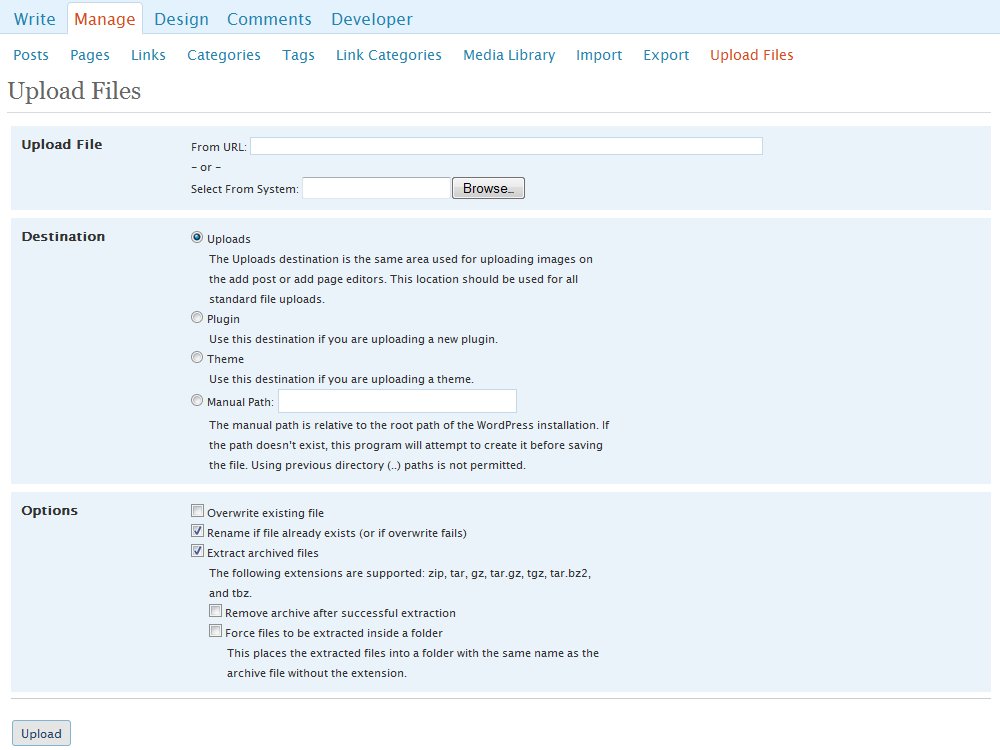
WP Easy Uploader was created to make the life of WordPress bloggers easier by allowing an Administrator to add plugins, themes, and any type of file to WordPress directly from inside WordPress. You no longer have to load up an FTP client just to try out that latest plugin or to upload a text document for people to download.
Current Features
- Upload any type of file to either the standard Uploads directory (just as images do when you are creating posts and pages) or to a path of your choosing.
- Manual paths are automatically created if they don’t exist.
- Easily upload plugins directly to the plugins directory and theme files directly to the themes directory.
- You can select to have archives automatically extracted to their destination. This means that plugins and themes will be taken care of for you, but it also means that you can zip up a large set of files and upload them quickly into a folder on your site. Currently zip, tar, gz, tar.gz, tgz, and tar.bz2 archives are supported.
- Options for overwriting existing files, renaming the fle if a file with that name already exists (or if overwriting fails), removal of the archive after file extraction, and forcing extracted files to be contained in a folder.
Thanks to File_Archive developed by Pablo Fischer, I was able to provide the extraction ability irregardless of server operating system. I have not tested his code extensively since I only have access to Linux-based servers. If you have any problems with the extraction ability, please contact me.
Planned Features
- Customizable permissions to allow for users with privileges below Administrator to upload files. My idea is for Administrators to have full access to all the uploader’s functionality while people below Administrator won’t have access to upload themes, plugins, or to manual paths and won’t be able to overwrite files or extract archives.
- If the above is implemented, I’d like to provide a menu of options for tailoring what minimum access level is required to access each function.
- Also if the first item is implemented, I’d like to add logging in order to keep track of who uploaded what and when. This would be useful for keeping track of anyone (such as a contributor) who is using the file space inappropriately.
Warning
This plugin does have the ability to overwrite any file inside your WordPress site as long as write permissions for the web server are enabled for that file and the overwrite checkbox has been selected. This means that you can overwrite the wp-config.php file if you tried to. So, always make sure that you are paying attention to what you are doing.
Requirements
- WordPress 2.2+ – This is as far back as I’ve tested the plugin. I’ve gone through each iterative version backwards, and I have yet to find a version back to 2.2 that this plugin doesn’t work with. If you have different results, please let me know.
Versions
- 1.0.1 – released on June 27, 2008
Initial concept - 1.0.2 – released on June 28, 2008
Updated to support WordPress Mu - 1.0.3 – released on June 30, 2008
Added support for PHP 4 - 1.0.4 – July 2, 2008
Fixed compatibility issue with the BackUpWordPress plugin - 1.0.5 – July 2, 2008
Internationalized the plugin; now it’s ready for translators - 1.0.6 – July 6, 2008
Added Turkish and Spanish translations. Fixed compatibility issue with the WeatherIcon plugin. Fixed parsing error with Windows servers. - 1.0.7 – July 8, 2008
Added mainland Chinese and Brazilian Portuguese translations. Added 2.6 support. - 1.0.7a – July 10, 2008
Added German translation. - 1.0.7b – July 21, 2008
Added Indonesian translation.
Thanks
- Arne Brachhold for providing some code that I found useful and incorporated into WP Easy Uploader.
- Henning Schaefer for PlugInstaller which was an inspiration for this plugin.
- Pablo Fischer for File_Archive which powers the extraction process for uploading archives.
Download
Please visit the WP Easy Uploader page on WordPress.org to download. Further information and installation instructions can be found there.
Donations Welcome
If you would like to donate to this project so that I can devote more time to development on this plugin and others like it, please click the button below. Thank you.

[...] WP Easy Uploader Code, Technology, and Random Ramblings [...]
hi. Thanks for plugin
perfect.
Regards
[...] WP Easy Uploader [...]
How do I get the uploaded images via easy-uploader to be listed in the “media library”?
Thanks for the great plug!
What a great plugin! Like the comment from dan on August 12th 2008, I would like to see the uploads in my media library, otherwise for normal uploads it’s a little pointless. Each uploaded file (even unzipped ones) need to be added to the posts table as type attachment for this to work.
I miss the ability to be able to upload files to the media library without having to write a post to attach them to, I think that way it is done now is a little backwards and this is where a plugin like this could really clean up!!
So far, brilliant!
I like so much ur plugin
this plugin very useful anda helping me
Thanks
[...] http://gaarai.com yang samu ini menciptakan plugin yang sangat usefull untuk kita. Please welcome, WP Easy Uploader Screenshot WP Easy [...]
[...] WP Easy Uploader – a powerful uploader which are special cater for wordpress, it include the feature that what you going to upload will be a plugin or theme, so that it will auto upload to the correct path and unzip it , because it support a lot of zip extension (zip, tar, gz, tar.gz, tgz, tar.bz2, and tbz) [...]
[...] 三等奖获得者,WP Easy Uploader,这是一个非常棒的 WordPress [...]
[...] Third place goes to WP Easy Uploader -WP Easy Uploader was created to make the life of WordPress bloggers easier by allowing an Administrator to add plugins, themes, and any type of file to WordPress directly from inside WordPress. You no longer have to load up an FTP client just to try out that latest plugin or to upload a text document for people to download. – http://gaarai.com/wordpress-plugins/wp-easy-uploader/ [...]
[...] 获得第三名的插件:WP Easy Uploader [...]
[...] 三等奖:WP Easy Uploader,这是一个非常棒的 WordPress [...]
[...] WP Easy Uploader [...]
[...] WP Easy Uploader – WP Easy Uploader was created to make the life of WordPress bloggers easier by allowing an Administrator to add plugins, themes, and any type of file to WordPress directly from inside WordPress. You no longer have to load up an FTP client just to try out that latest plugin or to upload a text document for people to download. [...]
[...] WP Easy Uploader [...]
[...] WP Easy Uploader [...]
[...] WP Easy Uploader: una manera de evitar el FTP para tener que subir plugins, temas y demás a nuestro WP. Útil sobre todo si es un blog con varios usuarios y sólo uno tiene acceso FTP. [...]
Nice idea.. but cant get it to work.. i have wp2.6.2, so dont know if that is causing the issue..
I am getting the following error:
Warning: raiseerror(PEAR/FixPHP5PEARWarnings.php) [function.raiseerror]: failed to open stream: No such file or directory in /home/htbyssfy/public_html/wp/wp-content/plugins/wp-easy-uploader/pear/PEAR.php on line 572
thanks
Erland, one of the commenters above said some important issues and nobody has replied. Are there are fixes to the problems he mentioned?
Thnx.
[...] WP Easy Uploader [...]
Aouni, the problem Shyam experienced is now resolved. I just released a new version, 1.0.8, which Shyam confirms as working.
gaari, thank you very much, now am going to use the plugin.
Hey Gaarai,
your plugin is awesome and a real time saver, but I don’t think that the problem with the permission issue is resolve. Even with 1.0.8 I cannot delete or upgrade plugins which I uploaded with your plugin. It doesn’t allow me to change the permission settings in my ftp program nor in my cpanel.
Would be great if you can fix this problem.
Thanks
[...] 插件三:WP Easy Uploader [...]
[...] multe despre el, aici si downloadul [...]
That would be great if we can have this plugin working on the user side : a little bit like notcot dot org
Lets say that user upload images, and links then the admin approve or not, then publish it…
and i think this plugin is pretty close to make it possible. Let me know if you think it is a good idea ?
I like the idea of this plugin a lot, as I set up blogs for friends now and again, and having something where they can upload plugins and themes without having to call me is AWESOME
However, I have a problem similar to Shyam and I believe the problem is based on case-sensitive directories. the code requires File/Archive.php for example but on the filesystem, it’s file/archive. Same for PEAR.php vs pear.php.
I don’t know if this is a limitation of the zip extraction, or if you didn’t preserve case when you built the zip file, but that’s the problem I’m having now.
I’m not sure if the answer is to rename the directories and files or change the code
here’s an example:
Warning: main(PEAR.php) [function.main]: failed to open stream: No such file or directory in /homepages/0/d87225138/htdocs/blog/wp-content/plugins/wp-easy-uploader/pear/file/archive/reader.php on line 34
I did some more tests and I think my hosting provider changed out the unzip() tool on my server, because it seems it was packaged correctly. Not until I did \unzip -U (zip file) did it extract with the right case for the directories and files.
So, I guess it’s a false alarm. Great plugin!
[...] – but apparently can be used in plae of an FTP client to upload anything into WordPress. WordPress Easy Uploader. This entry was posted in WordPress Plugins. Bookmark the permalink. Post a comment or leave a [...]
[...] WP Easy Uploader was created to make the life of WordPress bloggers easier by allowing an Administrator to add plugins, themes, and any type of file to WordPress directly from inside WordPress. You no longer have to load up an FTP client just to try out that latest plugin or to upload a text document for people to download. [...]
This is exactly what I needed! Thank you so much!
很是有用的插件!
[...] 插件出处:http://gaarai.com/wordpress-plugins/wp-easy-uploader/ [...]
Hi,
First off – great plugin! It has saved me a lot of work!
Anyways, I have a problem with the plugin. When I try to use remote upload to upload a 60-70MB file, there is no response. It submits the information and then loads a white page. I checked for the file and it wasn’t uploaded.
Could you please look into it. Thanks!
[...] WP Easy Uploader [...]
[...] WP Easy Uploader was created to make the life of WordPress bloggers easier by allowing an Administrator to add plugins, themes, and any type of file to WordPress directly from inside WordPress. You no longer have to load up an FTP client just to try out that latest plugin or to upload a text document for people to download. [...]
[...] WP Easy Uploader که قصد معرفی اون رو در این پست دارم به شما اجازه میدهد [...]
[...] 三等奖:WP Easy Uploader,这是一个非常棒的 WordPress [...]
[...] Easy Uploader adalah plugins yang HARUS anda miliki. plugins ini sangat sangat luar biasa. karena hanya dengan sekali klik saja.. apapun akan terinstal didalam wordpress kita. dari themes sampe plugins lainnya. [...]
[...] WP Easy Uploader – $10 : Installing plugins in WordPress is such a hassle: find it, download it, un-zip it, upload it to server, install. Rinse-repeat. This plugin takes out all, most, of that hassle by downloading and unzipping the plugin or theme directly onto your server. It has easily saved me 30 minutes of tedium this year. [...]
[...] Wp Easy Uploader: ci si può dimenticare dell’ ftp. Permette di caricare ogni file, plugin o tema che sia, direttamente da WordPress. Anche in una directory a vostra scelta, qualsiasi tipo di file o archivio. [...]
Hey, Thanks a bunch for the Wp Easy Uploader plugin.
It has made my life a whole lot easier, and I’d recommend it to everyone.
So easy, so quick. well done.
Hi,
Tnx for nice plugin.
I translated it into Farsi (Persian) (faIR). You can add this files to \lang directory for Farsi language.
Farsi Language for wp-easy-uploader.
Good Luck
[...] WP Easy Uploader که می خوام بهتون معرفی کنم، می تونه به شما کمک کنه که [...]
I love this plugin.
However, once I upgraded to WordPress 2.7 I now cannot find where the settings are to upload.
Since there is no ‘Manage’ tab anymore.
Where did the wp easy uploader go?
thanks,
Christina
Hi Christina. 2.7 really did shuffle stuff around. Many things are easy to find, but things added to the Manage tab seem to have just exploded everywhere. For plugins like WP Easy Uploader that were in the Manage tab, they have now been dropped way down into the Tools tab.
Amazing Plugin
This is the first plugin that I install on all my new wordpress blogs and then use it to upload everything else.
Zipped files are easier to upload
Thank you sooooooooooo much..
Thanks Sarbjit. I’m glad that it is helpful to you.
[...] WP Easy Uploader [...]
[...] WP Easy Uploader – this alows me to upload files and themes, without downloading them locally, connecting to the server via secure ftp and uploading the files manually – can give it a URL, and it will download and extract. [...]
[...] 6、WP Easy Uploader [...]